

Microsoft’s Surface Pro 8 relies solely on USB-C and Thunderbolt 4 for power, data and video output. If you still use USB-A flash drives, SD cards or HDMI monitors, you will need adapters to bridge the gap between old and new ports. The Surface Pro 8’s two Thunderbolt 4 ports support USB4 at up to 40 Gbps, making it possible to connect high-bandwidth accessories such as 10 Gbps Ethernet adapters and NVMe SSD enclosures without compromise.
To expand a single port into multiple connections, USB-C adapters offer one or two essential ports, while multi-port hubs add USB-A, HDMI, SD card readers and Ethernet in a compact design. For a complete desktop setup you can dock through the magnetic Surface Connect port or via Thunderbolt 4 using Microsoft’s own Surface Dock models or third-party Thunderbolt 4 docks from Kensington and Razer.
In this guide we’ve tested both official and leading third-party solutions to help you choose the ideal accessory for everyday use, travel or demanding workflows
USB-C Adapters
USB-C adapters are compact, lightweight accessories designed to expand the functionality of a single USB-C port. They typically offer one or two additional connections, such as HDMI, USB-A, or Ethernet. These adapters provide a simple and portable solution for users who need quick access to essential ports without the bulk of a full docking station.
- The Surface Pro 8 features two Thunderbolt 4 ports, each supporting USB4 and capable of data transfer rates up to 40 Gbps.
- It can handle high-bandwidth USB-C accessories, including a USB-C to 10-gigabit Ethernet adapter and a USB-C to NVMe SSD enclosure.
Every Surface Pro 8 user should keep a USB-C to full-size USB-A adapter on hand. Having one means you can continue using existing flash drives, mice, keyboards, and printers without buying new peripherals, so you stay productive and save money whenever you need legacy ports.

Best USB-C to Full-Size USB 3.0 Adapter
This compact adapter is a must-have for home or travel, enabling you to connect traditional USB accessories with ease.
Syntech USB Type-C to USB Type-A Adapter (2 Pack)
2 x Compact & Multi-Stylish Metallic Non-Slip USB-C to USB-A AdaptersThe Full-size USB port, also known as USB Type-A, has been the most popular I/O port ever made, and many peripherals still rely on it for connectivity. These peripherals include computer mice, keyboards, printers, external hard drives, and more. Recently made laptops have started adopting USB Type-C as a new standard, leading to a lack of USB-A ports when connecting to your old peripherals.
This tiny dongle can instantly turn your Surface's USB-C port into a USB-A 3.0 port without requiring any driver installation. It features a stylish design, a zinc alloy metallic minimalist look, and a delicate non-slip embossment. It is available in two packs and has four colors for you to choose from - Gold, Rose Gold, Silver, and Space Gray.

The Full-size USB port, also known as USB Type-A, has been the most popular I/O port ever made, and many peripherals still rely on it for connectivity. These peripherals include computer mice, keyboards, printers, external hard drives, and more. Recently made laptops have started adopting USB Type-C as a new standard, leading to a lack of USB-A ports when connecting to your old peripherals.
This tiny dongle can instantly turn your Surface's USB-C port into a USB-A 3.0 port without requiring any driver installation. It features a stylish design, a zinc alloy metallic minimalist look, and a delicate non-slip embossment. It is available in two packs and has four colors for you to choose from - Gold, Rose Gold, Silver, and Space Gray.
Here are the latest top-rated deals for Syntech USB Type-C to USB Type-A Adapter (2 Pack).
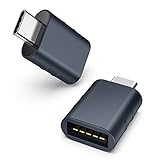 |
1. Syntech USB Type-C to USB Type-A Adapter (2 Pack) By Syntech $13.99 |
- Portability & Design
- Adapter length: 5-1/2 inches
- Colors:Gold Rose Gold Silver Space Gray
- Connectivity
- It turns a USB-C or Thunderbolt 3/4 port into a USB-A port
- Supports USB 3.1 Gen 1 (up to 5 Gbps) and is also compatible with USB 3.0/2.0
- Supports all USB Type-C enabled devices, including MacBook, tablets, and phones
- Outstanding Features
- Certified by USB-IF to be compliant with USB 3.1 Gen 1 standard
- Power output up to 5V/3A
- Package Contents
- 2 x USB-C to USB-A 3.1 Gen 1 adapter
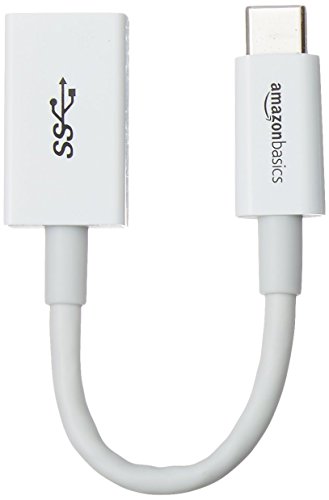
Amazon Basics USB-C to USB-A 3.0 Adapter
Here are the latest top-rated deals for Amazon Basics USB-C to USB-A 3.0 Adapter.
 |
1. Amazon Basics USB-C to USB-A 3.0 Adapter By Amazon Basics $8.99 $10.25 12% OFF |
When it comes to sharing content or enjoying entertainment on a bigger display, a USB-C to HDMI adapter is indispensable. By simply plugging into your Surface, you gain high-definition video and audio output for presentations, movie nights, or an extended desktop setup.
Best USB-C to HDMI Adapter
This adapter allows you to connect to a TV, external monitor, or projector at up to a stunning 4K resolution and 60Hz.
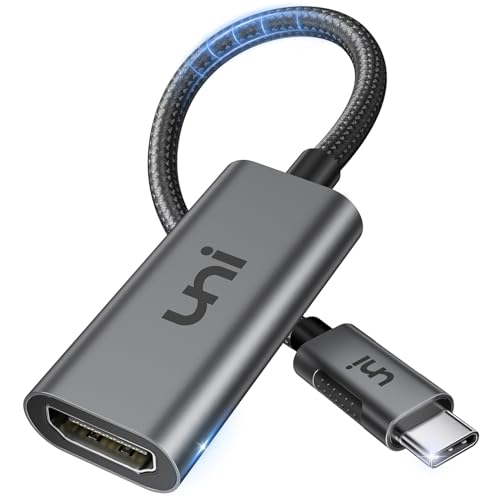
UNI USB-C to HDMI Adapter
High-quality USB-C to HDMI Adapter
The UNI USB-C to HDMI Adapter lets you mirror or extend your Microsoft Surface screen to any HDMI-compliant displays with high resolution up to Ultra HD (4K@60Hz - 4096x2160). It supports HDCP 2.2 compliant for playing protected content from iTunes, Netflix, DirectTV & more.
It made from premium aluminum alloy casing for better heat insulation and lasts longer. It is available in both Silver and Space Gray.
Here are the latest top-rated deals for UNI USB-C to HDMI Adapter.
 |
1. UNI USB-C to HDMI Adapter By uni $12.99 |
- Portability & Design
- Adapter length: 6 inches (150 mm)
- Colors: Silver Space Gray
- Connectivity
- It turns a USB-C port to an HDMI port
- HDMI 2.0 compatible and 4K-ready (4K@60Hz).
- Supports HDCP 2.2 compliant for playing protected content from iTunes/Netflix/DirectTV & more.
- Outstanding Features
- Premium aluminum alloy casing for better heat insulation and lasts longer
- Braided nylon cable for extra strength and durability
- Package Contents
- 1 x USB-C to HDMI adapter
- Lifetime warranty
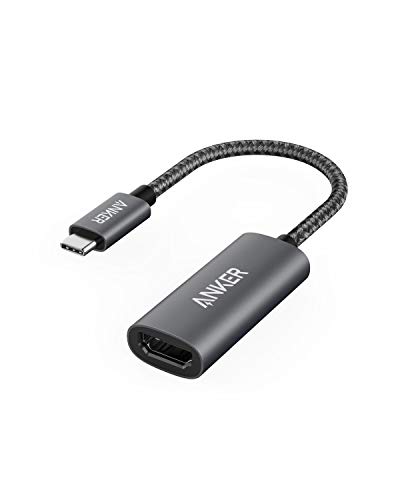
Here are the latest top-rated deals for Anker USB C to HDMI Adapter (4K@60Hz).
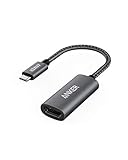 |
1. Anker USB C to HDMI Adapter (4K@60Hz) By Anker $16.99 $19.99 15% OFF |
Likewise, a USB-C to Ethernet adapter is a vital tool for anyone who values stability and speed. Whether you’re troubleshooting in a café with spotty Wi-Fi or working in an office that requires secure network access, this adapter delivers faster data rates and lower latency than wireless connections.

Best USB-C to Gigabit Ethernet Adapter
Ideal for corporate environments, IT teams, and network engineers, this adapter provides secure access to local networks and on-site maintenance capabilities.
TP-Link USB-C to Gigabit Ethernet Adapter UE300C
Here are the latest top-rated deals for TP-Link USB-C to Gigabit Ethernet Adapter UE300C.
 |
1. TP-Link USB-C to Gigabit Ethernet Adapter UE300C By TP-Link $14.99 $19.99 25% OFF |

2-in-1 Combo Adapter with USB and Gigabit Ethernet Port
This Surface USB-C to Ethernet and USB adapter is a great combo adapter that lets you connect your Microsoft Surface to a wired network connection while including a USB 3.0 port to expand more connectivity to your Surface.
The Ethernet port supports Gigabit network speed and has an indicator light for data transfer status. It supports all USB-C-enabled Surface devices and is also compatible with other USB-C-enabled devices.
Here are the latest top-rated deals for Microsoft Surface USB-C to Ethernet and USB 3.0 Adapter.
 |
1. Microsoft Surface USB-C to Ethernet and USB 3.0 Adapter By Microsoft $69.99 $94.99 26% OFF |
- Portability & Design
- Portable, strong, and well constructed.
- Color: Black
- Connectivity
- 1 x USB Type-A 3.1 Gen 1 portSupports data transfers up to 5Gbps.
- 1 x Gigabit Ethernet port Transfer rate: 10/100/1000 Mbps.
- 1 x USB Type-A 3.1 Gen 1 port
- Supported Surface Devices Surface Go 1-4 Surface Pro 7-9 Surface Pro X Surface Laptop 3-5 Surface Laptop Go 1-3 Surface Book 2-3 Surface Laptop Studio 1-2 Surface Duo 1-2
USB-C Hubs
USB-C hubs allow you to expand a single port into multiple connections, including USB-A, HDMI, SD card slots, and Ethernet. They draw power from the Surface Pro 8 and are designed for portability.
- Unlike adapters that provide only one or two additional ports, hubs enable you to connect several peripherals simultaneously.
Best Multi-Port USB-C Hub
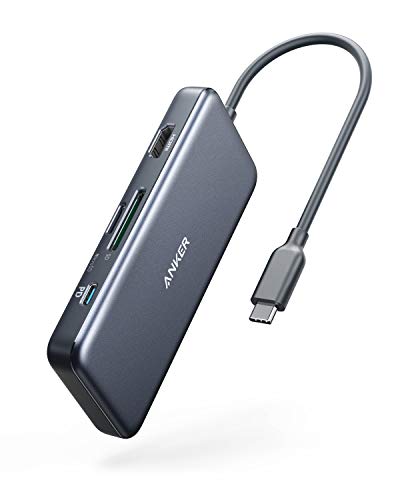
This USB-C hub includes all essential ports and supports 100W USB-C pass-through charging, delivering excellent functionality at a competitive price.
Anker PowerExpand+ 7-in-1 USB C Hub Adapter
Charge and get the 7 ports from a single USB-C port
This is an essential USB-C Hub you should have to expand your Microsoft Surface connectivities. It has 7 output ports including 2 x USB Type-A 3.0 ports, 1 x HDMI (4K@30Hz), 1 x MicroSD card reader, 1 x Full-size SD card reader, and 1 x USB Type-C PD charging port that supports up to 100W charging.
It's made with an anodized aluminum case to have a perfect space grey look and feel. It is small and has a slim design, it's a great portable docking solution for your laptop.
Here are the latest top-rated deals for Anker PowerExpand+ 7-in-1 USB C Hub Adapter.
 |
1. Anker PowerExpand+ 7-in-1 USB C Hub Adapter By Anker $39.99 |
- Portability & Design
- Colors: Gray
- Casing: Aluminum
- Colors:
- Connectivity
- 2 x USB 3.0 portsSupports data transfers up to 5Gbps.
- 1 x HDMISupports 1080p@60Hz and 4K UHD@30Hz.
- 1 x Full-size SD slot
- 1 x Micro SD slot
- 1 x Audio jack
- 1 x USB-C pass-through chargingSupports up to 100W PD.
- 2 x USB 3.0 ports
- Compatibility
- Microsoft Surface and all USB-C enabled Surface devices.
- USB-C enabled Windows Laptops or MacBook.
Microsoft USB-C® 5-in-1 Travel Hub
Full 10Gbps USB-C, USB-A, 4K@60Hz HDMI 2.0 Travel Hub from Microsoft
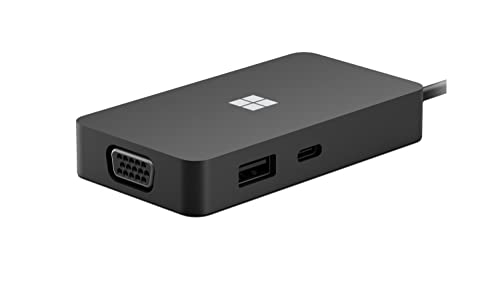
This travel hub is the first USB-C hub ever made by Microsoft. With the full USB-C adoption as we've seen in Microsoft Surface Pro X, Surface Neo, and Surface Duo, you'll definitely need a perfect Surface companion USB-C hub in order to be more productive. This elegant well-built travel hub lets you connect to different 5 ports including USB-C, USB-A, VGA, HDMI, and Gigabit Ethernet.
Both USB-C and USB-A support USB 3.2 Gen 2 with data transfers speed up to 10Gbps with pass-through charging. It is compatible with all Surface devices with USB-C ports including Surface Duo as well as Windows PC or Mac with USB-C ports.
Here are the latest top-rated deals for Microsoft USB-C® 5-in-1 Travel Hub.
 |
1. Microsoft USB-C® 5-in-1 Travel Hub By Microsoft $74.99 $99.80 25% OFF |
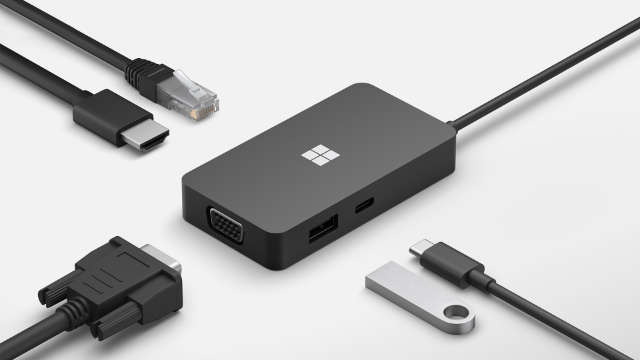
Source: Microsoft
- Available Ports (5)
- 1 x USB Type-C 3.2 Gen 2Supports data transfers up to 10 Gbps with pass-through accessory charging.
- 1 x USB Type-A 3.2 Gen 2Supports data transfers up to 10 Gbps with pass-through accessory charging.
- 1 x Gigabit EthernetSupports 10/100/1000 Mbps.
- 1 x HDMI 2.0Supports video output at 4K@60Hz.
- 1 x VGA
- 1 x USB-C™ captive cable with 200mm cable
- 1 x USB Type-C 3.2 Gen 2
- Supported Surface Devices Surface Go 1-3 Surface Pro 7-8 Surface Pro X Surface Laptop 3-4 Surface Laptop Go Surface Book 2-3 Surface Laptop Studio Surface Duo 1-2
- Portability & Design
- Dimensions: 3.50” x 1.89” x 0.59”
- Weight: 0.22 lbs (99.2 g)
- Color:Black
- Connector plating: Nickel plating
- Advanced Features
- Support for Android
- USB Power Policy
- HDMI priority
- CFU firmware update
- HDMI and VGA will not work simultaneously
- The adapter only charges the accessory and will not charge the host (Surface devices).

Best Budget USB-C Hub
This affordable 5-in-1 USB-C Hub includes essential ports for connecting three full-size USB devices and a TV or projector, and it features a USB-C port for passthrough charging support.
Anker 5-in-1 USB-C Hub
Here are the latest top-rated deals for Anker 5-in-1 USB-C Hub.
 |
1. Anker 5-in-1 USB-C Hub By Anker $16.99 |

Here are the latest top-rated deals for UGREEN 5-in-1 USB-C Hub.
 |
1. UGREEN 5-in-1 USB-C Hub By UGREEN $9.98 $15.99 38% OFF |
Docking Stations
Docking stations enhance a laptop’s connectivity by merging power delivery, video outputs, networking, and USB ports into a single hub. These docks transform your 2-in-1 device into a complete desktop workstation using just one cable.
- The Surface Pro 8 enables docking through its Surface Connect port or either of its two Thunderbolt 4 ports. This flexibility allows you to choose between Microsoft’s Surface Dock and a Thunderbolt 4/USB4 dock, both of which support multiple displays and provide ultra-fast data transfer.
- Docks typically feature an external power brick and offer higher wattage charging, multiple displays, audio, and network ports for a complete desktop setup. Unlike USB-C hubs that are ideal for travel, docks are better suited for permanent workstations.
Surface Docks
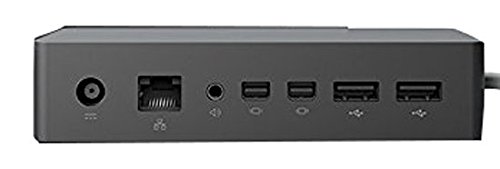
The Surface Pro 8’s magnetic Surface Connect port makes docking effortless, and Microsoft offers two dedicated solutions. The original Surface Dock instantly transforms your device with four USB-A ports, gigabit Ethernet, audio out, power, and dual Mini DisplayPorts for two 4K screens.
The Surface Dock 2 upgrades that experience with four 10 Gbps USB-C and two USB-A ports, dual 4K@60 Hz video over USB-C, gigabit Ethernet, a headset jack, and a 199 W power brick.
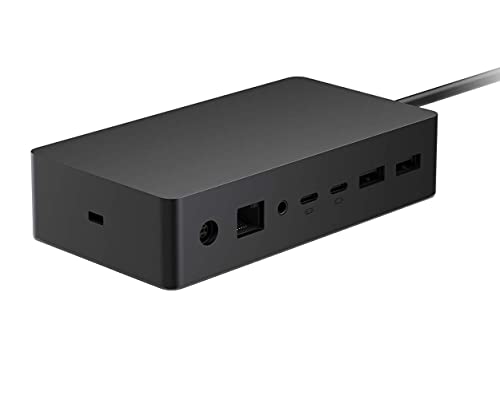
Microsoft Surface Dock 2
This upgraded second-generation docking solution features four USB-C ports and an extended Surface Connect cable, delivering improved convenience and seamless connectivity for your Surface Pro 8.
The Most Powerful Dock with Dual 4K@60Hz & 4 x 10Gbps USB-C ports
Microsoft Surface Dock 2 is an updated version of the long-debuted original Surface Dock since 2015. This 2020 Surface Dock 2 is a future-ready dock with 4 x USB-C and 2 x USB-A ports, all USB 3.2 Gen 2 with 10 Gpbs speed.
The new dock can also output dual 4K displays at 60Hz via DisplayPort 1.4a over USB-C available on the 2 x USB-C ports on the back of the dock. It also has a gigabit Ethernet port, a headset jack, and a power port with a 199W power adapter included in the box.
Here are the latest top-rated deals for Microsoft Surface Dock 2.
 |
1. Microsoft Surface Dock 2 By Microsoft $209.99 $259.99 19% OFF |
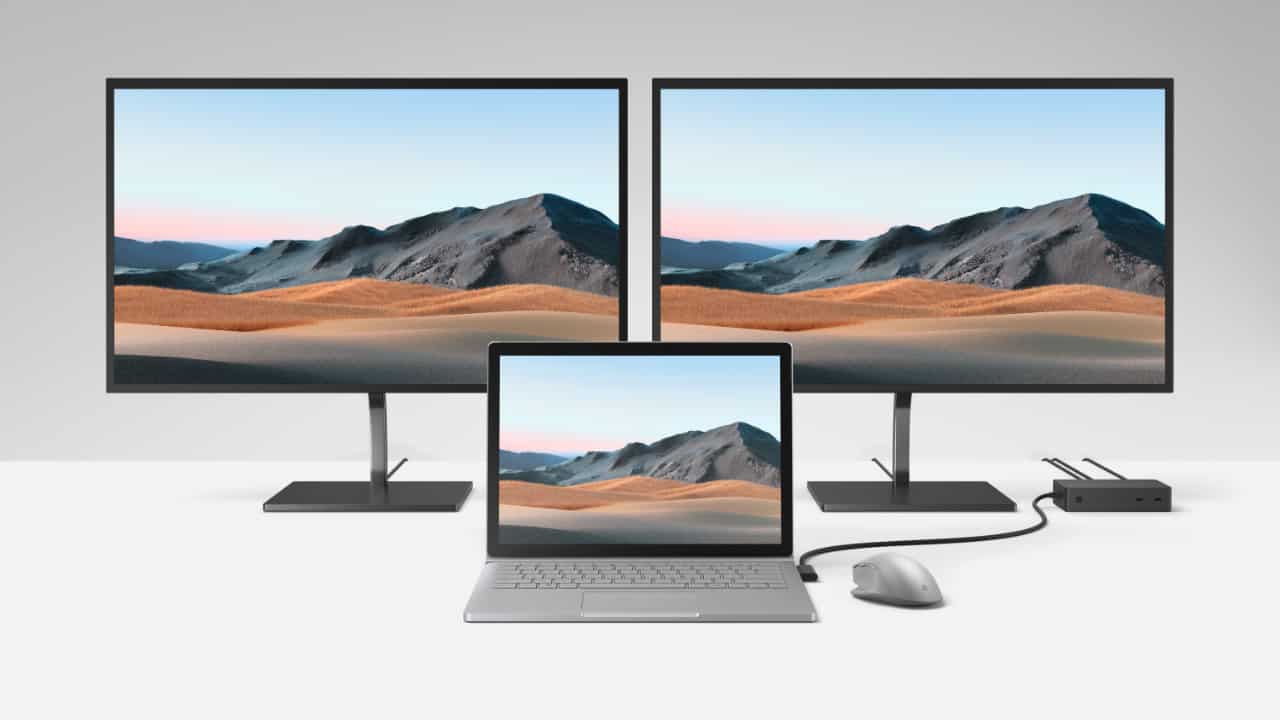
Source: Microsoft
- Available Ports & Slots (10)
- 2 x USB-C (front)Supports USB 3.2 Gen 2 (10Gbps) and 15W power output.
- 2 x USB-C (back)Supports USB 3.2 Gen 2 (10Gbps), DisplayPort 1.4a, and 7.5W power output.
- 2 x USB-ASupports USB 3.2 Gen 2 (10Gbps) and 7.5W power output.
- 1 x Gigabit Ethernet port
- 1 x Audio jack
- 1 x Power port
- 1 x Kensington lock slot
- 1 x Surflink cableCable length: 31.5” (80cm).
- 2 x USB-C (front)
- Display Output Capability
- 2 x displays with 4K@60Hz
- 2 x displays with 5K@30Hz
- Connect and Charge with a single cable
- The hub has a 199W power supply that can power the hub and charge your Surface simultaneously.
- Compatible with all Surface Connect enabled Surface.
- Compatible with:Surface Go 1-3 Surface Pro 5-8 Surface Pro X Surface Laptop 1-4 Surface Laptop Go Surface Book 2-3 Surface Laptop Studio
- Supports 4K@60Hz with:Surface Go 2-3 Surface Pro 7-8 Surface Pro X Surface Laptop 3-4 Surface Laptop Go Surface Book 3 Surface Laptop Studio
- Compatible with:
Microsoft Surface Dock (1st Gen)
This Microsoft docking solution for your Surface Pro 8 provides all essential ports and supports dual-display output for seamless connectivity.
Perfect Docking Experience with Dual Displays Out, Gigabit, and 4 USB Ports
Microsoft Surface Dock is a solid solution for those who want to use their Surface PC as their primary workstation when they are at home or office. It can transform not only your Microsoft Surface but also any Surface Go, Surface Pro, Surface Laptop, and Surface Book series with Surface Connect into a full desktop PC.
The Microsoft Surface Dock is my best docking station solution I have ever have. By plugging in the magnet Surface Connect cable and everything will instantly work. The dock comes with four high-speed USB 3.0 ports, a gigabit Ethernet port, an audio output, a power port, and two Mini DisplayPorts which claim that it can support two 4K displays.
Here are the latest top-rated deals for Microsoft Surface Dock (1st Gen).
 |
1. Microsoft Surface Dock (1st Gen) By Microsoft $140.38 $199.99 30% OFF |
- Available Ports & Slots (10)
- 2 x Mini DisplayPort
- 4 x USB 3.0 portsSupports data transfers up to 5Gbps with 7.5W power output.
- 1 x Gigabit Ethernet port
- 1 x Audio jack
- 1 x Power port
- 1 x Kensington lock slot
- 1 x Surflink cableCable length: 25.6” (65cm).
- Display Output Capability
- 2 x displays with FHD@60Hz
- 2 x displays with 4K@30Hz
- 1 x display with 4K@60Hz
- Connect and Charge with a single cable
- The hub comes with a 90W power supply that can power the hub and charge your Surface at the same time.
- Compatible with all Surface Connect enabled Surface.Surface Go 1-3 Surface Pro 3-8 Surface Pro X Surface Laptop 1-4 Surface Laptop Go Surface Book 1-3 Surface Laptop Studio
Thunderbolt™ 4 Docks
Thunderbolt 4/USB4 docks transform a single port into a full-featured workstation hub by delivering power, ultra-fast data transfer, and high-resolution video all at once. For home or office use, Microsoft’s Thunderbolt 4 Dock delivers seamless plug-and-play support.
For enterprise environments, Kensington’s SD5750T adds a robust power adapter, dual 4K at 60 Hz outputs, and security software. For power users, Razer’s Thunderbolt 4 Dock offers ten ports, multi-display support, and customizable RGB lighting.

Microsoft Surface Thunderbolt 4 Dock
Discover a versatile Thunderbolt 4 Dock designed to seamlessly work with your Surface Pro 8 and other Surface devices that have USB-C ports, as well as most Windows 11 devices equipped with USB4 or Thunderbolt 4 ports.
Here are the latest top-rated deals for Microsoft Surface Thunderbolt 4 Dock.
 |
1. Microsoft Surface Thunderbolt 4 Dock By Microsoft $194.99 $299.99 35% OFF |
It offers seamless connectivity, dual 4K displays, Gigabit Ethernet, and a 180W power adapter, plus security features and DockWorks™ software.
Kensington SD5750T Thunderbolt™️ 4 Dock for Microsoft Surface
First Thunderbolt™️ 4 Dock Designed Exclusively for Surface
Free yourself from headaches with the first Thunderbolt™️ 4 dock designed for Surface. Kensington worked directly with Microsoft to provide professional-level connectivity for working seamlessly with all Microsoft Surface devices with Thunderbolt™️ 4 enabled. The dock also comes with Intel Vt-d DMA protection to block peripheral devices from unauthorized access to your Microsoft Surface system memory.
Moreover, the dock can also output dual 4K displays at 60Hz or a single 8K@30Hz with its three available Thunderbolt™️ 4 downstream. It also has a Gigabit Ethernet port, an SD card reader, a headset jack, a USB 2.0 port, three USB 3.2 Gen 2, and a power port with a 180W power adapter included in the box. The dock can deliver up to 90W of power to charge your Microsoft Surface at full speed.
The dock has an integrated mounting slot and a lock slot that is easily firmly secure and protects your dock simultaneously. In addition, it comes with a free Kensington DockWorks™ software that can be configured to automatically disconnect your Microsoft Surface from Wi-Fi while docking and connected to the Ethernet port. The software also supports MAC Address pass-through & resetting, device connection monitoring, and more.

Here are the latest top-rated deals for Kensington SD5750T Thunderbolt™️ 4 Dock for Microsoft Surface.
 |
1. Kensington SD5750T Thunderbolt™️ 4 Dock for Microsoft Surface By Kensington $201.48 $289.99 31% OFF |
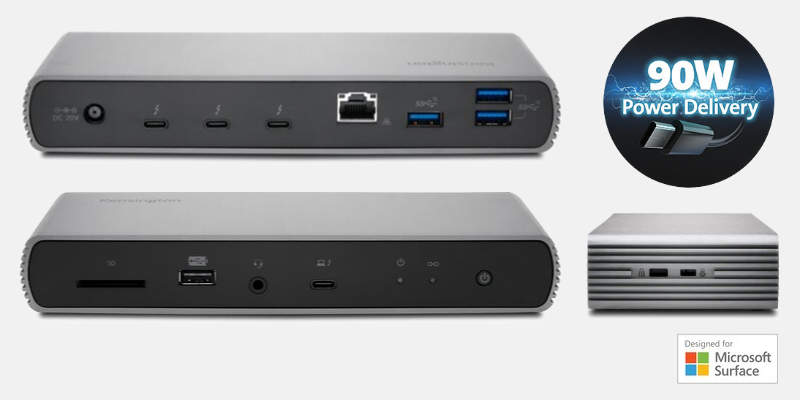
- Front Ports (4)
- 1 x Thunderbolt™️ 4 UpstreamConnect and charge your Microsoft Surface up to 90W (5V/9V/15V@3A & [email protected]).
- 1 x 3.5 mm Audio Jack
- 1 x SD Card Reader 4.0Supports SDXC UHS-II speed.
- 1 x USB-A 2.0 Supports data transfer speed up to 480 Mbps with 7.5W (5V/1.5A) power output.
- 1 x Thunderbolt™️ 4 Upstream
- Rear Ports (8)
- 3 x Thunderbolt™️ 3 DownstreamConnect to external displays and peripherals.
- 3 x USB-A 3.2 Gen 2Supports data transfer speed up to 10Gbps with 4.5W (5V/0.9A) power output.
- 1 x Gigabit Ethernet port
- 1 x Power port
- 3 x Thunderbolt™️ 3 Downstream
- Left (2)
- 1 x Mounting slot
- 1 x Lock slot
- LED (2)
- 1 x Blue Link LED
- 1 x Green Power LED
- Display Output Capability
- 2 x displays with 4K@60Hz
- 1 x display with 8K@30Hz
- Connect and Charge with a single cable
- The dock comes with a 180W power supply that can power the dock and charge your Microsoft Surface at the same time.
- Compatible with
- Surface Pro 8 Surface Laptop Studio
- Windows 10/11 PCs with Thunderbolt™️ 4 port.
- Mac with M1 processor.
- Mac with Thunderbolt™️ 3 running macOS 11.1 Big Sur or later.
- In the Box
- 1 x SD5750T Dock
- 1 x Thunderbolt™ 4 passive cable (0.8m)
- 1 x Power Supply Unit (180W)
- 1 x Instruction Guide
- 1 x Warranty Card
- 1 x Compliance Sheet
- 1 x Welcome card
Full Thunderbolt™ 4 Functionality with Razer Chroma™️ RGB Support
Connect and light up your desk with Thunderbolt™ 4 dock and chroma support from Razer. The dock can expand your Microsoft Surface connectivity with the 10 additional ports it has. It is compatible with all Thunderbolt™ 4, USB4, and some Thunderbolt™ 3-enabled devices.
The dock is also capable of outputting dual 4K displays at 60Hz over the three available Thunderbolt™ 4 downstream ports available on the back of the dock. It also has a gigabit Ethernet port, a headset jack, and a power port with a 135W power adapter included in the box. The dock can deliver up to 90W of power to charge your Microsoft Surface at full speed.

Here are the latest top-rated deals for Razer Thunderbolt 4 Dock.
 |
1. Razer Thunderbolt 4 Dock By Razer $289.99 $329.99 12% OFF |
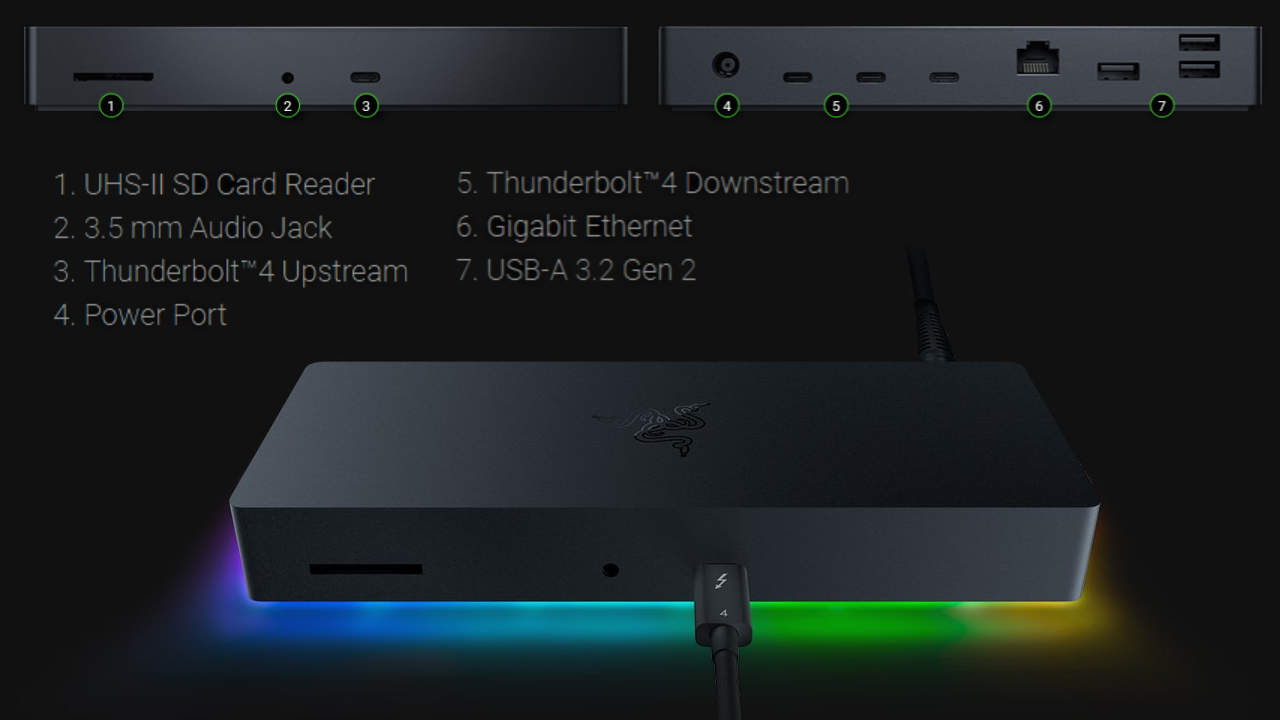
- Front Ports (3)
- 1 x Thunderbolt™ 4 UpstreamConnect and charge your Microsoft Surface up to 90W.
- 1 x 3.5 mm Audio Jack
- 1 x SD Card ReaderSupports SDXC UHS-II speed.
- 1 x Thunderbolt™ 4 Upstream
- Rear Ports (8)
- 3 x Thunderbolt™ 4 DownstreamConnect to external display and peripherals.
- 3 x USB-A 3.2 Gen 2Supports data transfer speed up to 10Gbps.
- 1 x Gigabit Ethernet port
- 1 x Power port
- 3 x Thunderbolt™ 4 Downstream
- Razer Chroma™ Support
- Supports 16.8 million colors, countless patterns, and dynamic in-game lighting effects.
- Customization with Chroma Studio, Visualizer, Connect, and Workshop.
- Display Output Capability
- 2 x displays with 4K@60Hz
- Connect and charge with a single cable
- The dock comes with a 135W power supply that can power the dock and charge your Microsoft Surface at the same time.
- Compatible with
- Surface Pro 8 Surface Laptop Studio
- Windows 10/11 PCs with Thunderbolt™ 4 port.
- Mac with M1 processor.
- Mac with Thunderbolt™ 3 running macOS 11.1 Big Sur or later.
- In the Box
- 1 x Razer Thunderbolt™ 4 Dock Chroma
- 1 x 135W Power Adapter
- 1 x Regional Power Cord
- 1 x 2.62 ft (0.8m) Thunderbolt™ 4 Cable
- 1 x Razer logo sticker set
- 1 x Product Information Guide
Final Thoughts
As the Surface Pro 8 moves entirely to USB-C and Thunderbolt 4, adapters, hubs, and docks become essential for connecting legacy devices and expanding your setup. USB-C adapters add one or two ports for quick fixes, USB-C hubs deliver multiple connections on the go, and docking stations plug in via Surface Connect or a Thunderbolt 4 port to provide power, data, and video for a full desktop experience.
Our tests of Microsoft’s official accessories and top third-party options will help you choose the right solution for everyday use, travel, or demanding workflows


